
Access, Risk & Tax
How to Check if a Crypto Platform Is FSCA Licensed in South Africa
Search the FSCA register in two minutes: where the FSP search is, why to search the legal name, what Authorized versus Applied means, and how to confirm Crypto Assets under Products Approved.
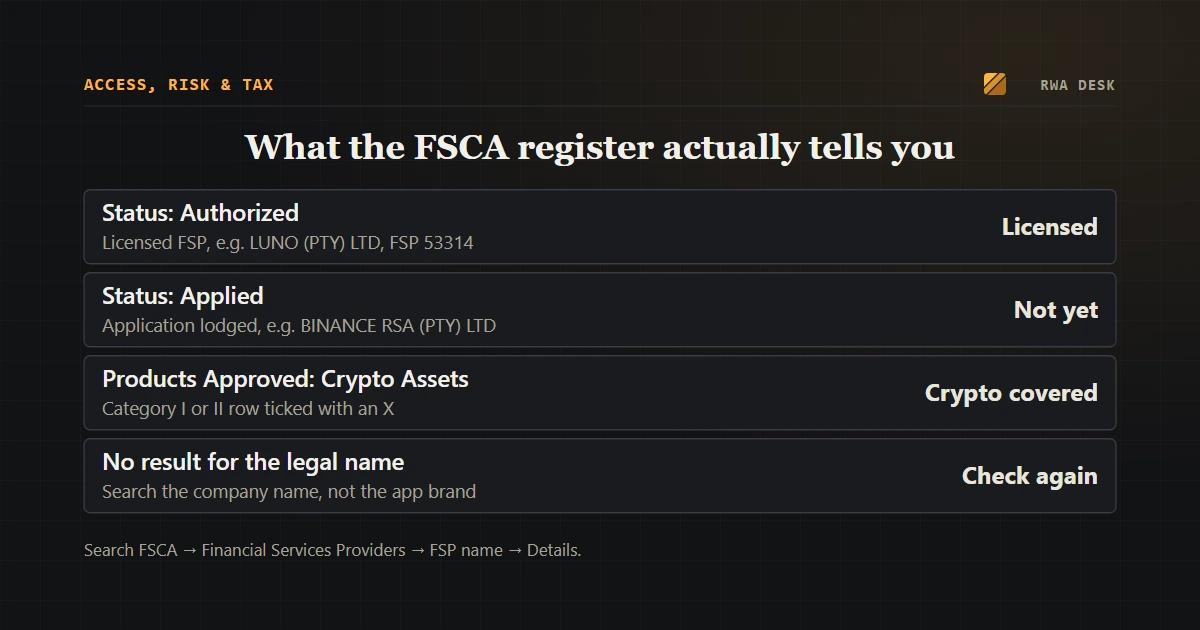
Before you send rands to a crypto platform, it takes about two minutes to check whether the Financial Sector Conduct Authority (FSCA) has actually licensed it. The check is free, needs no login, and the answer is more specific than most people expect: the register shows a status, a date and the exact product categories the company is allowed to deal in.
This guide walks through the search on the FSCA site as it looked on 13 October 2026, and explains which results count and which do not.
Why crypto platforms in South Africa need an FSCA licence
On 19 October 2022 the FSCA published General Notice 1350 of 2022, which declared crypto assets a financial product under the Financial Advisory and Intermediary Services Act (FAIS). From then on, anyone who advises on crypto or acts as an intermediary for it as a regular part of their business needs to be an authorised financial services provider (FSP).
Existing businesses got a transition window: they could keep operating as long as they applied for a licence between 1 June and 30 November 2023. Operating without a licence and without that exemption is an offence under FAIS, with a fine of up to R10 million, up to ten years' imprisonment, or both.
So a platform that serves South Africans and is still not authorised years after the window closed is telling you something. That is what the search is for.
Step 1: open the FSP search on the FSCA website
On fsca.co.za, go to Regulated Entities and choose the search for Financial Services Providers. The newer search page lists it under "Legacy Searches", with a note that these tools belong to the regulator's older system and are being updated, so the layout may change.
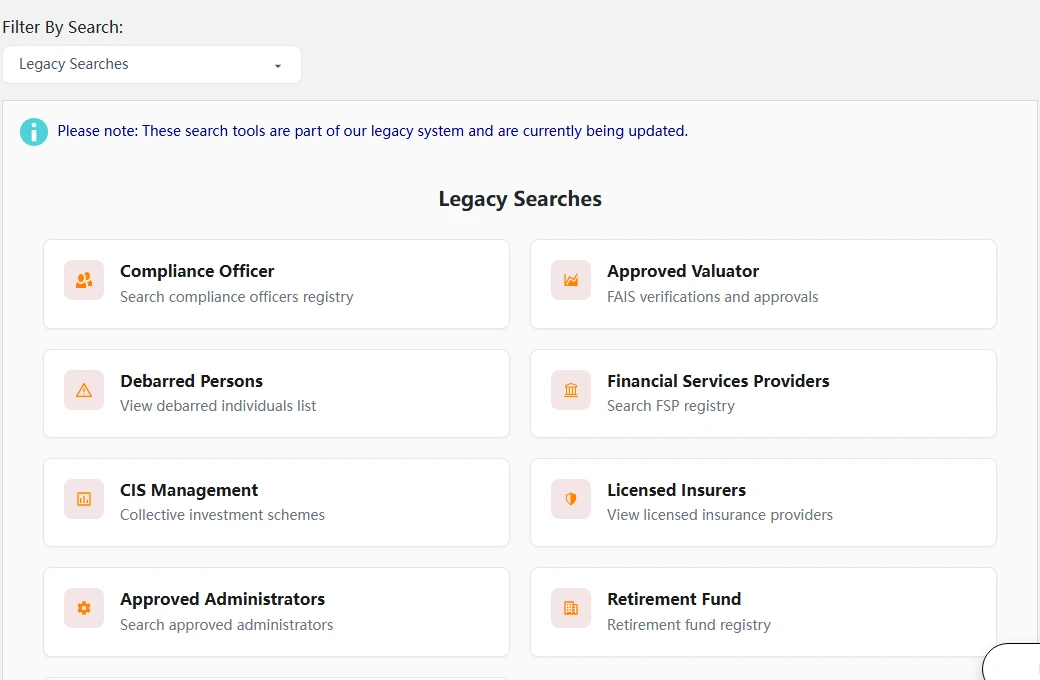
The Financial Services Providers tile ("Search FSP registry") opens the register you need. Debarred Persons is useful if you are checking an individual adviser.
The tile takes you to the actual form at www2.fsca.co.za. It has four boxes: FSP number, FSP name, postal code and a person's ID number.
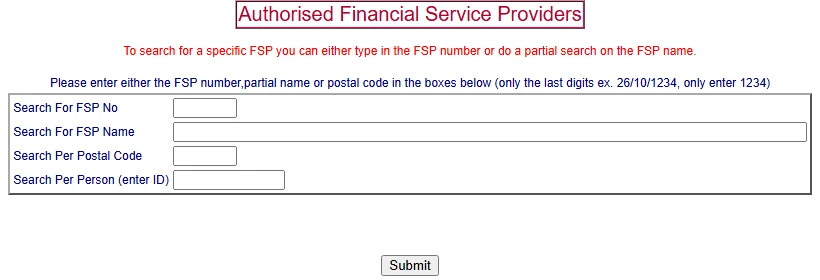
Fill in only one box. For the FSP number, the form wants the last digits only: for 26/10/1234 you enter 1234.
Step 2: search the company's legal name, not the app name
The register lists companies by their registered names. Type part of the name into Search For FSP Name and press Submit. Partial matches work, so "Luno" finds LUNO (PTY) LTD and "VALR" finds both VALR (PTY) LTD and VALR DAM PTY LTD.
If the brand name returns nothing, that is not yet a verdict. Look in the platform's terms of use or website footer for the legal entity and its FSP number; South African licensees normally state it. Then search by that number. A platform that will not tell you which company you are contracting with is a warning sign on its own.
Step 3: read the Status column
The results table shows the FSP number, name, trading name and, most importantly, Status. Two statuses come up for crypto firms, and they mean very different things.
Authorized means the FSCA has granted the licence. When we searched on 13 October 2026, LUNO (PTY) LTD (FSP 53314) and VALR (PTY) LTD (FSP 53308) both showed Authorized.
Applied means an application has been lodged but not granted. On the same day, searching for "Binance" returned one entity:
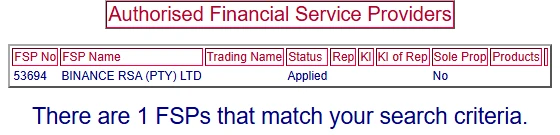
An application on file is not a licence. "Applied" is the status to read carefully, not skim past.
The FSCA's own figures show why this status still appears: by 31 March 2026 it had received 533 crypto asset licence applications and approved 310. Statuses change, so search again on the day you plan to deposit rather than relying on any article, this one included.
Step 4: open Details and check Products Approved
Press Details next to an authorised FSP. The top of the page shows the FSP type, company registration number and Date Authorised. Below that are collapsible sections; the one that matters is Products Approved.
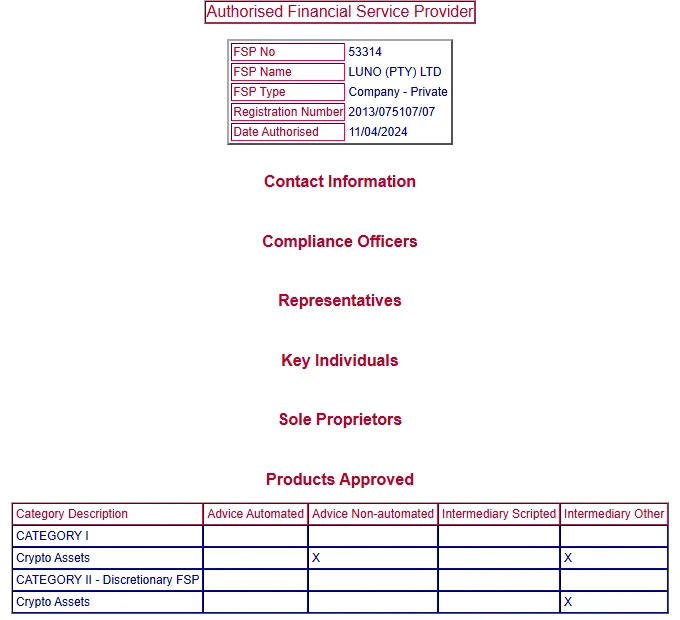
Luno's record lists Crypto Assets under Category I and under Category II, the discretionary category.
What to look for:
- A Crypto Assets row exists. An FSP licence on its own is not enough; a company licensed only for, say, short-term insurance is not authorised to deal in crypto.
- The X marks show which services are covered. "Advice" columns mean the firm may give advice; "Intermediary" columns cover acting on your behalf, such as executing buys and sells.
- Category II appears only where the firm may manage assets on a discretionary basis.
You do not need the personal sections (compliance officers, key individuals) to judge a platform.
What a licence does and does not cover
An FSCA licence regulates how the company deals with you: disclosures, complaint handling, fit-and-proper staff. It does not guarantee the price of anything you buy, and it does not make every product on the platform a South African product.
That matters for tokenised stocks. When you buy xStocks on a licensed local platform, the platform is licensed, but the token is issued offshore by Backed, a Jersey issuer, as a secured tracker certificate that gives you no ownership of the share and no vote. Our explainer on why tokenised stocks pay dividends but give you no vote covers the structure, and the Luno and Binance comparison for tokenised US stocks shows how the licensing difference plays out in practice.
Also check the FSCA warnings
The register only tells you who is licensed. The FSCA separately publishes warnings about unregistered firms and clones that borrow a real company's name, under News → Warnings and alerts on fsca.co.za. A clone often quotes a genuine FSP number with a different website or WhatsApp number, so if the contact details you were given do not match the register, reach the firm through the details the register shows.
If something does not add up, the FSCA call centre number on the register page is 0800 20 37 22.
Quick checklist before you deposit
- Find the legal entity name and FSP number in the platform's terms or footer.
- Search the FSCA register by that name or number.
- Status shows Authorized, not Applied.
- Under Details, Crypto Assets appears in Products Approved.
- The name and contact details match the website you are actually using.
- The firm is not named in an FSCA warning.
Once a platform passes, the next questions are about the product itself. The four checks to run before buying tokenised stocks pick up from here.